Finding the best web hosting for WordPress means choosing a plan you can afford after the introductory offer ends and manage without unnecessary technical work. Hostinger is worth considering if you want to launch a blog or small business website with guided setup. The important buying decision is which resources and recovery tools your project actually needs.
Affiliate Disclosure: This article may contain affiliate links. If you make a purchase through one of these links, we may earn a commission at no additional cost to you. This does not influence our editorial evaluation.
Review method: Official pricing, documentation, and policies were checked on September 14, 2026. Independent test findings are attributed to TechRadar. We did not benchmark an account ourselves. Recommendations are editorial analysis; the included interface image comes from Hostinger’s tutorial.
Quick editorial verdict
Hostinger is worth considering for a first blog, portfolio, or small business website. We would start with Premium for an infrequently updated site and consider Unlimited for an active publishing schedule. Its long-term value depends on whether the higher renewal price still makes sense for your project. The plan tables below separate confirmed resources from disputed allowances.
Hostinger quick facts
| Item | What to know |
| Product and operator | Hostinger managed WordPress hosting, offered by the Hostinger group |
| Control panel | hPanel |
| Entry offer reviewed | $2.99 per month equivalent; $143.52 paid for 48 months |
| Entry renewal shown | $10.99 per month equivalent |
| Refund framework | 30 days for eligible purchases; exclusions apply |
| Best fit | Blogs, portfolios, and small business websites |
| Evidence level | Official documentation plus attributed external testing |
Sources: Official WordPress plans, technology overview, and refund policy.
What is Hostinger
Hostinger provides website hosting and related services. This review focuses on its WordPress offering, rather than its separate AI builder, VPS, or other products. WordPress is the content-management system you use to publish pages and posts; the hosting account supplies the environment that keeps the site accessible.
For a first-time owner, the useful distinction is responsibility. A managed hosting package can reduce infrastructure work, but you still decide which plugins to install, what content to publish, and how to maintain your business processes. Do not interpret “managed” as someone taking full responsibility for every third-party plugin or store workflow.
Key Hostinger features and their practical value
WordPress setup and everyday administration
Hostinger describes hPanel as its own interface for managing domains, email, files, databases, and WordPress installations. Its platform uses LiteSpeed and SSD or NVMe storage. These are documented platform features, not evidence that every site loads equally fast. Hostinger technology.
hPanel handles the hosting account; WordPress handles your pages, posts, themes, and plugins. That separation becomes useful when a plugin error blocks WordPress administration: hosting-level file and database access provides another route for troubleshooting. Keep the account owner’s login separate from access you give a content editor.
Backups and recovery
The offer reviewed lists weekly backups for Premium, daily backups for Unlimited, and daily plus on-demand backups for Cloud Startup. Plan details.
In Hostinger’s documented workflow, open Websites, choose the site’s Dashboard, then Files → Backups. Where your plan supports manual generation, use Generate new backup and check the completed timestamp. A complete recovery copy needs both site files and the database. Hostinger backup instructions.
For a weekly publication, losing work since the last weekly copy may be manageable. For daily articles, registrations, or orders, it may be costly. Daily backups improve that interval but still do not protect every transaction as it happens. Choose recovery frequency by the amount of new data you can afford to lose, and retain a copy outside the hosting account.
Migration of an existing website
Hostinger offers free website migration. The migration service is useful when moving an established WordPress installation, but eligibility and the actual work involved should be checked before canceling the old account. Official migration service.
A sensible migration checklist includes forms, checkout, redirects, images, email routing, and SSL. Keep the old hosting active until you have checked the destination and DNS change. A migration promise should not replace checking your own important pages and transactions.
Staging for theme and plugin changes
Hostinger’s staging tutorial documents a WordPress → Staging menu in hPanel. Create a staging copy, assign its subdomain, then open its administration area to test changes. The tutorial names Business and Cloud eligibility; confirm staging in the checkout summary for a newly named Unlimited subscription. Official staging instructions.
Publishing staging replaces live files and databases. If a store received new orders after the copy was created, publishing that older database could overwrite them. Use staging to test the change, then choose a deployment process that preserves newer live data. The tutorial describes an automatic pre-publication backup and a Revert option. Staging deployment behavior.
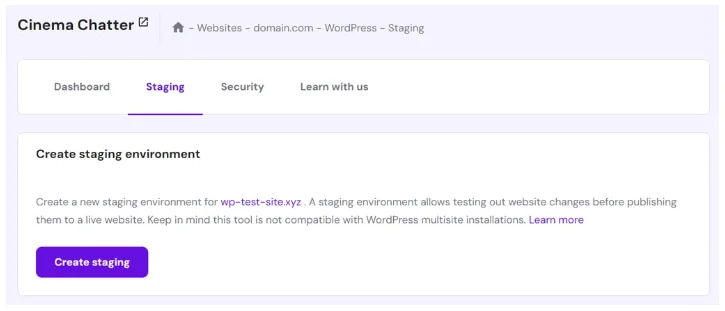
Figure 1. Hostinger’s tutorial screenshot shows the staging entry point and a multisite limitation notice. This is an official documentation image, not our account or proof of the current interface. Image source and tutorial.
LiteSpeed caching and optimization
Hostinger documents preset optimization profiles under WordPress → Overview in hPanel: enable LiteSpeed, open Change settings, and apply a profile. A configuration log provides a Restore option. The LiteSpeed Cache plugin supplies the WordPress-side controls. Hostinger optimization guide.
Caching can serve an existing page copy instead of rebuilding it for every visit. Begin with conservative settings, then check navigation, forms, and checkout before making stronger CSS or JavaScript changes. Test the same page more than once so you can distinguish an initial uncached visit from a cached one. Caching behavior and presets.
For an article site, cached public pages are valuable. For a store or membership site, personalized activity still needs processing. A higher optimization score on a blog post does not establish that checkout remains fast or correct. Avoid applying an aggressive preset solely to chase a score.
AI assistance for WordPress
Hostinger advertises AI tools for building, troubleshooting, and managing WordPress content. Their practical value is reducing repetitive setup and administration; generated copy and proposed fixes still need review. A general AI feature label does not specify every action or usage allowance, so choose the hosting tier for its core resources before treating AI as a deciding benefit. WordPress product description.
Ease of use for different users
For a beginner, the main advantage is handling common hosting tasks in one interface. For an intermediate owner, the useful features are staging, backup access, and resource visibility. Developers should check the exact SSH, WP-CLI, PHP-version, and deployment requirements of their project before subscribing.
A practical first-session checklist is to install WordPress, connect the domain, verify HTTPS, send a test form submission, and locate the available recovery points. Before migrating a store, separately check payment callbacks and email delivery. These tasks reveal whether the subscription fits your actual workflow.
Performance and reliability
Performance evidence for the best web hosting for WordPress decision
TechRadar’s review, updated April 23, 2026, reports the following results from its own test setup. They provide external evidence, but the exact test dates and configuration cannot be mapped confidently to today’s Unlimited offer. TechRadar’s original tests.
| Reported test | Result | Scope |
| GTmetrix LCP | 0.607 seconds | Largest content element loading |
| k6 load test | 15 requests/second | 20 virtual users |
| Uptime.com response time | 382 ms average | Reported seven-day window |
The same review gives conflicting uptime figures in different sections, so no measured uptime percentage is adopted here. Treat these historical results as encouraging evidence for a small site, not a capacity guarantee for your installation. No raw dataset was reanalyzed.
Hostinger identifies Phoenix, Boston, and Asheville among its North American infrastructure locations and describes global caching infrastructure. Confirm which locations are available for your chosen product. Infrastructure information. A location near your audience can be a useful starting point, but uncached requests and database work still need adequate resources.
Its hosting agreement specifies a 99.9% monthly uptime guarantee. Eligible failures can lead to a requested credit of 5% of that month’s hosting fee toward future services. Claims have a 30-day deadline, and exclusions include scheduled maintenance, customer-caused issues, and DDoS attacks. This is a contractual remedy, not a measured uptime result. Hosting agreement.
Resource limits matter more than the word unlimited
Hostinger’s central pricing table publishes these resources. They explain why the number of sites alone is a poor sizing metric. Current resource table.
| Resource | Premium | Unlimited | Cloud Startup |
| CPU cores | 1 | 2 | 4 |
| RAM | 2 GB | 3 GB | 4 GB |
| PHP workers | 40 | 60 | 100 |
| Inodes | 400,000 | 600,000 | 2,000,000 |
| Database size limit | 3 GB | 3 GB | 6 GB |
PHP workers process requests that need PHP execution; they are not a guaranteed count of simultaneous visitors. Inodes count files and directories, so many small files can exhaust the allowance before storage fills. A media-heavy blog should watch both storage and inodes. A store should give more weight to uncached activity and database work.
Hostinger pricing and plans
Pricing checked September 14, 2026. The following are displayed 48-month offers, paid upfront, with monthly-equivalent renewal rates. Taxes and optional extras are additional where applicable. Checkout determines your actual total. Official prices.
| Plan | Intro per month | 48-month total | Renewal per month |
| Premium | $2.99 | $143.52 | $10.99 |
| Unlimited | $3.99 | $191.52 | $16.99 |
| Cloud Startup | $7.99 | $383.52 | $25.99 |
The current homepage lists storage of 20 GB SSD, 50 GB NVMe, and 100 GB NVMe respectively. It also describes a domain and included mailboxes as free for the first year, rather than forever. Current hosting offers.
The displayed rates make the initial term inexpensive, but a four-year purchase is still a commitment. At the renewal monthly equivalents, a 12-month budget would be $131.88 for Premium, $203.88 for Unlimited, or $311.88 for Cloud Startup. These are arithmetic planning figures, not quoted 12-month contracts or predictions of future prices.
Which Hostinger plan offers reasonable value
Premium is the sensible starting candidate for a small, infrequently updated website whose resource needs are modest. Unlimited deserves consideration when more frequent recovery points and extra headroom justify the higher ongoing cost. Cloud Startup should be chosen for demonstrated resource requirements, rather than because its name sounds more professional.
In the offers shown, Unlimited costs $48 more than Premium over the first 48 months. At the displayed renewal equivalents, the difference grows to $72 per year. We would weigh that difference against the time and potential lost work associated with less frequent recovery points.
Business naming and the remaining allowance differences
The naming question is resolved: Hostinger’s limits guide says Business is offered as Unlimited on most pages, while existing Business customers keep their current limits. The website and mailbox differences below remain unresolved across the public documents. Limits guide and central pricing.
| Entitlement | Sales table | Support guide |
| Premium websites | 3 | 3 |
| Unlimited websites | Unlimited | Unlimited |
| Cloud Startup websites | Unlimited | 100 |
| Unlimited mailboxes per site | Unlimited for year one | 5 during included trial |
| Cloud Startup mailboxes per site | Unlimited for year one | 10 during included trial |
For a new purchase, use the sales offer to understand what is being advertised, but obtain written confirmation if a disputed allowance determines your choice. Existing customers should check their own hPanel entitlement. Neither a rebrand nor an updated landing page proves that an older account has changed. We do not treat the conflicting mailbox counts as settled facts.
Email delivery deserves a separate check
Hostinger’s limits guide caps server-script mail at 10 messages per minute and 100 per day and recommends SMTP as an alternative. This is distinct from mailbox count. A store with order messages or a busy contact form should configure an appropriate email service and check its own sending limits. Server email limits.
Free plans and trials
No generally available free managed WordPress hosting plan or specific hosting trial duration was verified for these offers. A refund period requires a purchase and should not be described as a free trial. The refund policy references trial-related exceptions, so anyone offered a trial should read its separate terms. Refund terms.
Refunds and cancellation
Eligible hosting transactions generally fall under a 30-day refund window, including eligible renewals. Important exclusions include cryptocurrency payments, the first payment after a free trial, and certain additional products. Domain renewals are nonrefundable; the value of a promotional domain may be deducted from a hosting refund. Refund policy.
Auto-renewal is enabled by default under Hostinger’s terms. Charges may occur before expiration, so check the actual charge date and disable renewal in your account ahead of it if you do not intend to continue. Turning off renewal does not itself request a refund. Subscription terms.
Before cancellation, download the data you need and arrange any migration. For an eligible refund, contact support and identify the transaction and service. Request confirmation of the amount and refund destination. Do not assume that canceling hosting also cancels a domain or email subscription.
Security and privacy
Hostinger describes SSL, firewall protection, and malware scanning among its safeguards. These reduce particular risks; they do not make a website immune to compromised credentials or vulnerable extensions. Security features. Use unique passwords, enable available two-factor authentication, and restrict administrative access to the people who need it.
Its privacy policy covers account and identity information, service providers, international processing, and retention. Closing an account does not necessarily erase all records immediately: legal obligations, fraud prevention, disputes, and residual backups can require retention. Privacy policy.
If your website collects customer information, review where relevant data is processed and which services receive it. Hosting security does not by itself determine whether your own forms, analytics, or marketing setup meet your obligations.
Customer support
The customer-service policy lists live chat and an email/ticket route, with a stated one-business-day email response target. The current contact page emphasizes Hostinger Agent and access to the team. Support policy and contact options.
The homepage advertises 24/7 support. We did not measure response times or verify priority handling for every plan. No general technical phone-support channel was verified in the reviewed contact sources. Buyers who need phone assistance should settle that point before purchasing. Hosting offer.
TechRadar also reports a 17-minute ticket reply to a WordPress subdomain question, describing it as accurate but jargon-heavy. That is one external support experience, not a response-time commitment. Original support test.
For a useful presales check, ask whether your selected plan includes staging and request its mailbox entitlement and renewal price. Those answers address actual uncertainties in the current offer. For troubleshooting, provide the affected URL, error message, and time of occurrence without sending passwords in chat.
Pros and cons
Pros: An approachable initial cost for owners comfortable prepaying a long term.
Pros: A central administration workflow that may simplify first-site ownership.
Pros: Several resource tiers let buyers match spending to a project’s needs.
Cons: Renewal budgeting is materially different from the promotional headline.
Cons: Some published site and mailbox allowances conflict across official sources.
Cons: Resource ceilings remain relevant even when an allowance is described as unlimited.
Who should use Hostinger and who should skip it
Hostinger is worth considering for a blogger starting with a manageable publishing schedule, a freelancer maintaining a portfolio, or a small business launching an informational website. A modest store may also fit, provided its recovery needs and uncached workload are matched to the actual plan.
It is less convincing for someone who cannot accept the renewal cost, requires a verified phone-support route, or needs contractual resources that the offer does not clearly establish. A mission-critical workload deserves its own capacity and recovery assessment before any hosting commitment.
Best use cases
For a portfolio, prioritize simplicity and avoid paying for capacity you will not use. For an active blog, put more weight on image storage and recovery after plugin changes. For a store, start with the consequences of losing recent orders and test checkout under realistic conditions. These priorities lead to a better plan choice than buying solely by website count.
Value for money and editorial assessment
Unlimited’s initial $48 premium over Premium may be worthwhile for an active site if the recovery tools save even a few hours of rework. At renewal, reassess whether its additional $72 annual equivalent remains justified. A mostly static portfolio may get little benefit from paying for the larger tier; a growing store may outgrow it regardless of website allowance.
We do not assign an overall numerical score: the documented resources and historical third-party tests support a purchase discussion, but do not measure today’s complete customer experience. The decision should rest on the plan’s confirmed features, total cost, and the workload you intend to run.
Frequently asked questions
Is Hostinger worth considering for a first WordPress website?
Yes, if you want a manageable setup and the full subscription cost fits your budget. Start with your site’s recovery and resource needs, then confirm the selected plan.
Is Hostinger the best web hosting for WordPress?
It may suit a particular project, but this single-product review does not establish a market-wide winner. Your required resources, support channel, and renewal budget should decide.
Does the advertised monthly price mean monthly billing?
For the offers reviewed here, no. It is a monthly equivalent for a 48-month upfront payment. Check the billing term and total shown at checkout.
Will my renewal cost the same as the introductory offer?
Do not budget on that assumption. The displayed renewal equivalents are substantially higher, and future charges follow the applicable subscription terms.
Does unlimited hosting mean unlimited computing power?
No. CPU, memory, storage, and other resource limits still matter. Confirm any website or mailbox allowance that is essential to your project.
Can I move an existing WordPress website?
Hostinger offers a migration service. Verify eligibility and check forms, email routing, checkout, and redirects before closing your previous account.
Is the money-back guarantee unconditional?
No. Eligibility, timing, payment method, domains, and add-on exclusions affect the refundable amount. Read the policy for your exact purchase.
Should a store use weekly backups?
A weekly recovery point may leave too much recent order data exposed. Choose a recovery schedule based on how much new data the business can afford to lose.
FAQ references: plans, resource limits, migration, subscription terms, and refund policy.
Final verdict
For buyers researching the best web hosting for WordPress, Hostinger is a credible option for a beginner blog or small business site. The strongest argument is practical convenience at a modest initial cost. The limitations are higher renewal spending, finite resources, and some unresolved differences between published plan descriptions.
Choose it when the confirmed subscription fits your real workload and ongoing budget. Delay the purchase if an essential entitlement is still unclear. A lower introductory price is useful only when the hosting remains suitable after launch.
Check current Hostinger pricing.