



WordPress themes determine more than your site’s appearance: they also shape how you build and maintain it. Divi combines a premium theme with a visual website builder, giving beginners, bloggers, and small businesses control over page layouts without requiring code for everyday design work. Its appeal is strongest when you want a distinctive website and expect to keep refining it.
Divi deserves consideration for its reusable design tools and flexible licensing. The trade-off is that you are adopting a substantial design system, with its own learning curve and ongoing maintenance requirements. This review explains those choices using current official documentation, with Divi 5 as the main reference.
Last Fact-Checked: September 15, 2026.
Review method: This is a research-based editorial review, not a hands-on test. Product details come from linked first-party sources. Speed and support promises are identified as company claims; recommendations are editorial analysis. No independent performance benchmark, security audit, or customer-support test was conducted. This review covers the Divi 5 product generation without claiming a particular patch is the latest.
Affiliate Disclosure: This article may contain affiliate links. If you make a purchase through one of these links, we may earn a commission at no additional cost to you. This does not influence our editorial evaluation.
Quick Answer and Editorial Verdict
Divi is worth considering if you want to design branded pages visually and reuse a consistent style across your website. It is particularly appealing for owners who manage several sites or build websites for clients.
Its strongest advantage is control over both individual pages and broader site templates. Its biggest practical limitation is the commitment to learning and maintaining its builder workflow. A mostly text-based blog with a simple layout may not benefit enough to justify that extra layer.
Divi Quick Facts
| Item | Details |
| Product | Divi |
| Developer | Elegant Themes |
| Category | Premium WordPress theme and visual builder |
| Product generation reviewed | Divi 5 |
| Entry price | $89 per year |
| Base lifetime option | $249 once |
| Website allowance | Unlimited personal and client websites |
| Hosting included | No |
| Refund window | 30 days; AI usage exclusions apply |
| Best fit | Branded business sites, portfolios, and reusable page designs |
Pricing and license details are listed on the official pricing page. Refund qualifications are explained below.
What Is Divi
Divi is developed by Elegant Themes for WordPress. The Divi Theme includes its builder; a separate Divi Builder plugin lets you retain that design workflow with another theme. You do not need to install that separate plugin simply to use the builder inside the Divi Theme. Elegant Themes product FAQ
Think of the theme as the foundation for your site’s presentation and the builder as the environment in which you assemble it. Divi is not a hosting account, a Blogger template, or a standalone article-ranking service.
The current Divi 5 overview describes a rebuilt platform focused on performance and modern design controls. Older tutorials may show a different interface, so match any installation or customization guide to your installed version.
Key Divi Features for WordPress Themes Buyers
Visual Editing and Responsive Design
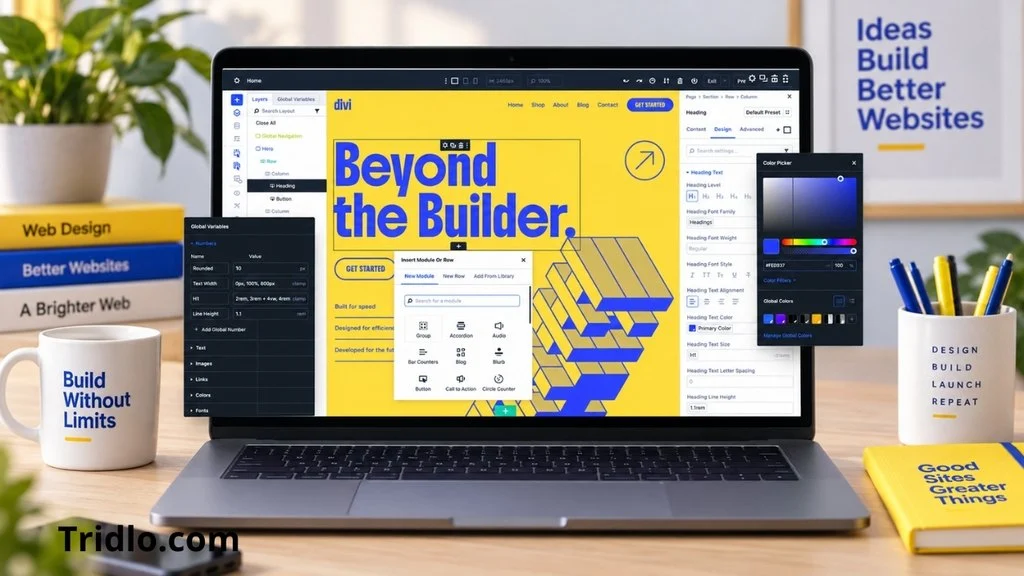
Divi provides on-page visual editing, responsive controls, and reusable styles. You can adjust layout and appearance while viewing the design rather than working only through an abstract settings screen. Divi feature overview
For a small business, this makes changing a service section or promotional page more approachable. However, a desktop layout is only the starting point. Review small-screen navigation, button spacing, image crops, and long headings before publishing. Visual editing reduces coding requirements; it does not make those design decisions for you.
Site Templates and Dynamic Content
The Theme Builder supports shared headers, footers, and body templates, including templates assigned to specific content. Dynamic content lets templates display relevant WordPress information instead of repeating manually entered details. Divi Theme Builder
A useful editorial setup is one shared article template with a consistent title area, content width, and related navigation. You can then improve that template without redesigning each article. Plan its assignments carefully: a change to a shared template can affect many pages at once.
Starter Sites and Premade Layouts
Divi Quick Sites offers a starter-site route and an AI-generated-site route. These can provide a foundation for pages and site styling. Divi Quick Sites
The practical benefit is avoiding a blank canvas. Still, a generated or imported site needs your real services, verified business details, original images, working forms, and meaningful navigation. Treat any rapid site-generation promise as a company description of initial assembly, not a measured timeline for a finished business website.
WooCommerce Store Design
Divi supplies WooCommerce design tools for product and shopping-related layouts. This gives store owners more control over presentation within a WordPress commerce setup. Divi ecommerce features
The design layer is only part of a functioning store. Budget separately for payment processing and any required commerce extensions. Before launch, complete a test purchase and check variations, cart behavior, checkout, and order emails. An attractive product page cannot compensate for a broken purchasing flow.
Divi AI and Optional Services
Divi AI can assist with layouts, text, images, and code inside the design workflow. Its convenience comes from working close to the page being built. Divi AI overview
Generated copy still needs factual checking and editing. Generated code should be reviewed on a staging site. Neither AI-assisted writing nor the theme itself provides evidence that a page will rank or convert well.
The pricing page distinguishes unlimited layout, text, image, and code generation from AI Agent usage. Pro currently includes $5 in monthly Agent allowance; additional Agent use can create usage charges. Do not interpret the word “unlimited” as covering every AI feature. Divi plan inclusions
Ease of Use and Setup
Divi is approachable for beginners who are willing to learn a visual builder. Start with one page and a limited set of fonts, colors, and spacing choices. Intermediate users are more likely to benefit immediately from reusable templates; advanced users can apply deeper customization, but must still check version compatibility.
A practical setup sequence is:
Prepare WordPress hosting and a restorable backup if replacing an existing design.
Download Divi from your Elegant Themes account and upload the theme ZIP through WordPress’s theme installer.
Activate the theme, connect the account details needed for updates, and start with a simple layout.
Establish global design choices before creating many pages.
Check menus, forms, mobile layouts, and update behavior before launch.
Consult the Divi 5 documentation for the exact interface used by your version. Check your host against the official hosting requirements; upload and memory limits can affect setup and editing.
Performance and Reliability
Elegant Themes presents Divi 5 as a faster, leaner foundation. That is a company claim, not a load-time result from this review. Divi 5 architecture overview
There is also a specific compatibility qualification. Official documentation explains that unsupported legacy modules can load the older framework, limiting the performance benefits on affected pages. Check each third-party module’s Divi 5 status before migrating. Backward compatibility documentation
For your own evaluation, test a representative article, landing page, and product page where relevant. Use the same hosting, cache configuration, and test conditions before and after changes. Record mobile loading behavior and layout shifts, and check the editor separately from the public site. These are suggested evaluation steps, not tests performed for this review.
No universal speed score or uptime percentage is assigned here. A theme cannot determine the reliability of your hosting, images, scripts, and plugins on its own. Recent Divi 5.10 release notes document fixes including a memory issue on large pages, reinforcing the practical importance of updates rather than establishing a current stability score.
SEO Considerations When Choosing WordPress Themes
Use Divi’s design flexibility to make content easier to read: a clear main heading, logical subheadings, descriptive links, and a usable mobile layout. Keep decorative effects subordinate to the article or service information readers came to find.
For a publishing site, use shared templates for presentation and maintain a predictable article-writing workflow. Verify your chosen SEO plugin with the exact theme and plugin versions installed. This review does not establish universal compatibility with every SEO extension or promise improved search rankings from a theme change.
Divi Pricing and Plans
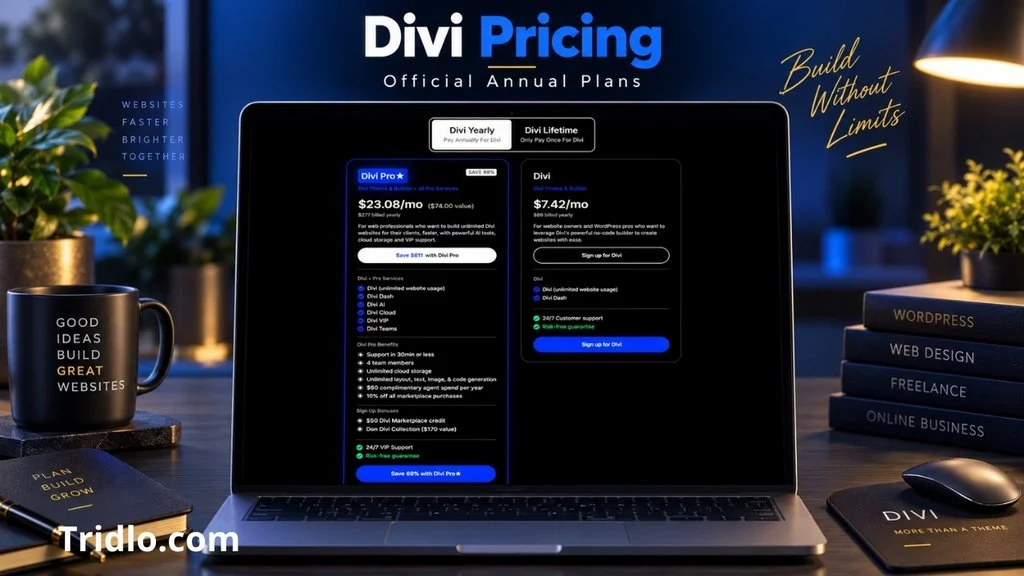
Prices checked September 15, 2026, in USD. The figures below are advertised amounts, not a completed checkout quote.
| Plan | Advertised billing | Main distinction |
| Divi | $89 yearly | Base theme and builder |
| Divi Pro | $277 yearly | Divi plus recurring Pro services |
| Divi Lifetime | $249 once | Base lifetime access, updates, and support |
| Divi Lifetime + Pro | $297 today; $212 yearly for Pro services | Lifetime Divi with recurring services |
The monthly equivalents displayed on the site are not monthly payment plans. Annual renewals are budgeted at the displayed annual rates; no different renewal rate is shown for the two annual plans. The mixed lifetime bundle labels $297 as “today” and $212 as annual services: confirm the first service charge and next billing date at checkout. Official Divi pricing
Which Plan Makes Financial Sense
The base annual plan is the lower-commitment starting point. The base lifetime plan is more compelling when you expect sustained use: three annual payments at $89 total $267, exceeding $249. This is simple editorial arithmetic, assuming unchanged prices and excluding taxes, upgrades, and optional services.
Pro is worth evaluating when AI, cloud assets, and collaboration would save recurring work. A solo blogger should identify a concrete need before buying that bundle. Hosting, domain registration, paid extensions, and usage-based AI costs remain separate budget decisions.
Free Plan and Trial Options
The reviewed purchase page does not list a free installable Divi theme plan or a conventional unpaid full-theme trial. Its 30-day offer is a purchase-backed refund guarantee.
Divi AI separately has limited free access documented in the Divi AI getting-started guide. This is not a free license for the complete theme. A fixed current allowance and standalone credit-card requirement were not confirmed for that AI trial, so check the account interface before relying on it.
Refunds and Cancellation
Elegant Themes offers a 30-day purchase refund window. Its terms exclude amounts already spent on AI usage; an AI Wallet deposit refund is limited to the unspent portion. To request a refund, contact the company through its official billing channel within the eligible period. Refund terms
Cancel recurring billing through your account’s subscription management, or contact accounts and billing support for assistance. Cancellation and a refund are separate requests.
For the annual theme membership, access continues until the paid term ends. After expiration, downloaded themes may still be used, but member-area access, new updates, and support end. Cancellation consequences
A site continuing to display does not mean its maintenance needs disappear. Keep an update plan if the site remains public.
Security and Privacy
This review does not establish that Divi is free from vulnerabilities. Keep WordPress, Divi, and extensions updated, protect administrative access, and maintain backups. Treat those as site-management responsibilities rather than included theme-level security guarantees.
Elegant Themes’ privacy policy describes account and billing data collection, support communication through Intercom, and requests for access to or deletion of personal data. For Divi AI, prompts, relevant website content, code, and associated information may be sent through OpenRouter to AI providers, whose processing and retention terms also apply. Elegant Themes privacy policy
That distinction matters if you handle client materials. Review what a feature sends before submitting confidential information. No specific universal AI retention period or zero-training guarantee was verified for this review.
Customer Support
Elegant Themes advertises 24/7 chat and email support. Divi VIP, included in Pro, advertises responses within 30 minutes. This is a company service promise, not a response time measured here. Official support information
The terms limit support to the company’s own products and exclude custom development and third-party products. Marketplace extension issues may need the extension author’s help. Support scope
For useful troubleshooting, provide your Divi version, WordPress version, affected page, recent changes, and steps to reproduce the issue. A response-time promise should not be interpreted as a guaranteed time to resolve an unfamiliar conflict.
Divi Pros and Cons
Pros
Visual control can reduce the coding needed for routine page design.
Shared templates make consistent presentation easier to maintain.
Unlimited site licensing is attractive for repeated client or personal projects.
The base lifetime option offers predictable theme-license spending.
Starter layouts can reduce the work involved in assembling an initial design.
Cons
The builder takes time to learn, particularly when global styles and templates interact.
Optional Pro services add recurring costs even beside a lifetime theme purchase.
Legacy extensions require compatibility checks and can affect the migration outcome.
Moving away from a builder-based design can require layout rebuilding.
Theme purchase does not remove hosting, maintenance, or editorial responsibilities.
These trade-offs are editorial judgments based on the documented workflow and terms, rather than a numerical test score.
Who Should Use Divi
Divi makes sense for small businesses that want distinct service pages, freelancers managing repeat projects, and bloggers who need designed landing pages alongside articles.
It also suits owners willing to invest in a reusable design system. The benefit is easier to justify when you expect to maintain and reuse that system over time.
Who Should Skip Divi
Consider skipping Divi if you need only a minimal publishing layout, do not want to learn a visual builder, or cannot budget for WordPress maintenance.
An existing site should also delay migration when a business-critical extension has not been verified with Divi 5. An upgrade should preserve the site’s essential functions, not merely introduce newer controls.
Best Use Cases
A service business can build a consistent family of service pages with clear inquiry buttons. A portfolio owner can reuse project templates while changing images and descriptions. A content publisher can design a strong homepage and category experience while keeping articles easy to edit.
For a store, Divi is most useful when custom product presentation matters enough to justify testing and maintaining the additional design layer. These are proposed applications, not customer case studies or measured revenue outcomes.
Value for Money
Divi’s value comes from whether you use its design system consistently. A reusable layout that saves repeated editing can be worth more than a long feature list. Conversely, paying for unused AI or collaboration tools weakens the value of a bundle.
Choose the base license first if it meets the site’s needs. Assess optional services by actual workflow benefit. No numerical editorial rating is supplied because this review lacks the hands-on evidence needed to score performance, support quality, and ease of use reliably.
Frequently Asked Questions
Is Divi worth it for a small business
It can be, especially when custom service pages and reusable layouts matter. Its value is less clear for a site needing only a basic, rarely changed design.
Is Divi a theme or a plugin
The Divi Theme includes its builder. A separate Divi Builder plugin makes that workflow available with other themes, subject to compatibility.
Is Divi free
The full theme is paid. Limited Divi AI access is a separate offering and should not be confused with a free theme license.
Can I use Divi on client websites
Yes. Elegant Themes permits unlimited personal and client website use under its Divi licensing. This does not mean transferring or sharing your account credentials.
Does Divi Lifetime include all Pro services forever
No. The lifetime base license and recurring Pro services have different billing arrangements. Read the bundle’s service charges before purchasing.
Will Divi improve my Google rankings
A theme change alone does not establish a ranking improvement. Evaluate content quality, navigation, mobile presentation, and actual site performance rather than relying on a theme’s marketing.
What happens if I cancel my annual membership
You retain access for the paid term. Afterward, downloaded themes may continue to be used, but updates, support, and member-area access end.
Does the refund guarantee cover spent AI credits
The terms exclude amounts spent on AI usage. Refunds of AI Wallet deposits are limited to the unspent portion, subject to the applicable policy.
Final Verdict on Divi for WordPress Themes Buyers
Among the WordPress themes you might consider for a visually customized site, Divi offers a persuasive combination of reusable templates, broad design control, and flexible site licensing. It is strongest for owners who will use those capabilities repeatedly.
The decision should turn on workflow and ongoing costs. Learn the builder, verify important extensions, and distinguish the base theme license from optional services. If those commitments fit your project, Divi is worth considering. If your priority is a very simple publishing setup, its broader design system may add more work than value.
Visit Divi and Check Current Pricing
Divi 5 — We rebuilt Divi from the ground up.
Divi 5 New Theme

