




If you’ve been searching for “how to get your website at top of google search,” the first thing to understand is that reaching the top requires more than adding keywords to your pages. Google needs to discover your website, understand what it offers, and determine whether its content is useful for a particular search.
A well-optimized website combines relevant content, technical accessibility, helpful navigation, and credible signals from other websites. Getting those elements right can improve your visibility and attract visitors who are genuinely interested in what you offer.
The good news? You don’t need to be an SEO expert to begin making meaningful improvements.
This guide explains how to identify ranking problems, optimize individual pages, build search visibility, and measure your progress using practical techniques supported by Google’s official recommendations.
How to Get Your Website at Top of Google Search: The Essential Steps
Before making changes, understand what reaching the top actually means.
Google does not assign one permanent ranking to an entire website. It evaluates pages for individual search queries. Your homepage might rank prominently for your company name while a product page remains difficult to find for a competitive keyword.
Search results can also vary by location, device, language, and search context.
For example, a plumbing company in Chicago may benefit more from appearing prominently for “emergency plumber in Chicago” than from competing for the much broader phrase “plumbing services.”
The objective is not simply to attract more visitors. It is to attract the right visitors.
Here is a practical overview of the work involved:
| SEO priority | What you should accomplish |
|---|---|
| Google indexing | Make important pages accessible to Google |
| Keyword research | Identify searches relevant to your audience |
| Search intent | Match each page to what visitors want |
| On-page SEO | Improve titles, headings, and page content |
| Content quality | Provide useful and trustworthy information |
| Technical SEO | Improve usability and remove technical barriers |
| Internal linking | Help visitors discover related content |
| Link building | Earn relevant references from other websites |
| Performance tracking | Measure results and refine your strategy |
These activities support one another. Excellent content cannot perform effectively if Google cannot access it, and technical optimization alone cannot make an unhelpful page valuable to readers.
Google’s official SEO Starter Guide explains these fundamentals and makes one important point: there is no technique that automatically guarantees a first-place ranking.
1. Make Sure Google Can Find and Index Your Website
Imagine publishing an excellent article that nobody can discover through Google.
Before rewriting titles or building backlinks, verify that your important pages are eligible for indexing.
Check whether your website is indexed
Open Google and search for:
site:yourwebsite.com
Replace the example domain with your own website address.
This search can help you discover pages that Google has indexed, although it is not a complete inventory of your site’s indexed URLs.
For a more reliable diagnosis, use Google Search Console.
Visit Google Search Console and verify ownership of your website.
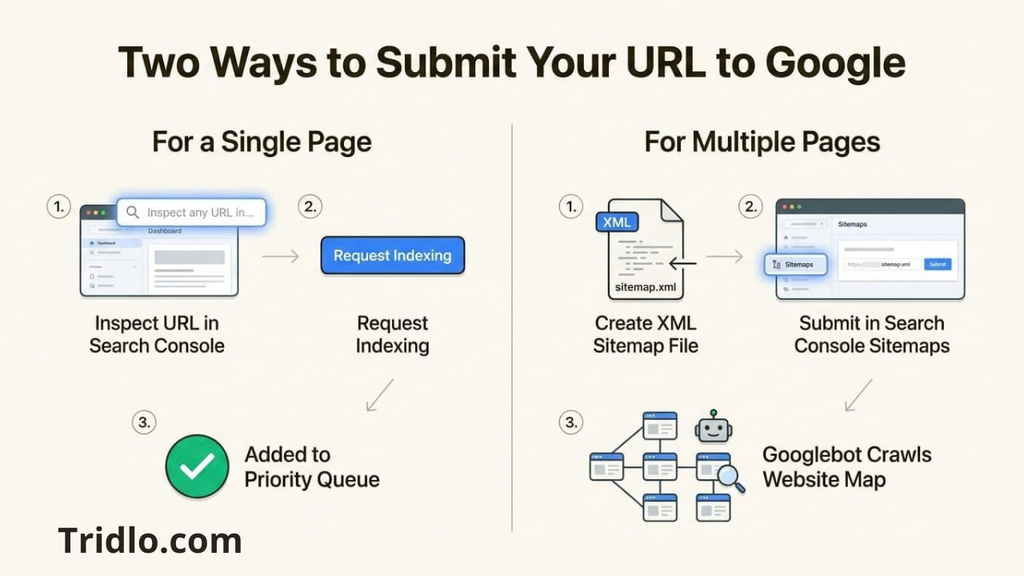
Once your property is connected, use the URL Inspection tool to examine a particular page.
You can determine whether Google has indexed that URL, identify certain accessibility problems, and request indexing when appropriate.
An indexing request does not guarantee that Google will immediately index or rank the page.
Submit your XML sitemap
A sitemap helps search engines discover important URLs on your website.
Many WordPress installations generate XML sitemaps automatically through WordPress itself or an SEO plugin.
Check whether your website has an existing sitemap, then submit its address using the Sitemaps section of Search Console.
Your sitemap should contain the canonical URLs you want Google to consider for indexing.
Avoid including unnecessary redirects, deleted pages, or URLs that you intentionally prevent from appearing in search results.
Fix technical problems that block indexing
If an important page is missing from Google, investigate whether:
- A
noindexdirective prevents indexing. - A robots.txt rule blocks access to resources Google needs.
- The page returns an error instead of a successful response.
- A canonical tag points to a different URL.
- The page is difficult to discover through internal links.
- Its content is substantially duplicated elsewhere.
Remember that robots.txt and noindex serve different purposes. Blocking crawling is not the same as explicitly requesting that a page stay out of Google’s index.
Practical recommendation: Start with your homepage, primary service pages, and most valuable articles. Confirm that Google can access them before investing time in advanced optimization.
For a broader explanation of how indexing fits into website visibility, explore this search engine optimization resource.
2. Research Keywords That Match What People Actually Want
Keyword research is not about finding the most popular phrase and repeating it throughout an article.
It is about understanding the words people use when they have a question, need a solution, or want to make a purchase.
Understand search intent before choosing a keyword
Consider these hypothetical searches:
| Search query | Likely search intent |
|---|---|
| What is SEO? | Learn a concept |
| How to improve Google rankings | Find practical instructions |
| Best SEO tools for small businesses | Compare available options |
| SEO consultant in Denver | Find a local provider |
| Buy website hosting | Purchase a service |
Although these searches relate to websites and digital marketing, they require different types of pages.
Someone looking for an explanation may prefer a detailed educational article. Someone searching for a specific service is more likely to appreciate pricing information, service descriptions, and a clear way to contact the business.
A page that ignores these differences may struggle to satisfy its intended audience.
Find relevant long-tail keywords
Long-tail keywords are relatively specific search phrases.
They can help you target a more clearly defined audience, although longer phrases are not automatically easier to rank for.
For example, instead of focusing exclusively on “website SEO,” you could research related queries such as:
- How to improve website ranking on Google
- How to get a new website indexed by Google
- How to rank a small business website
- Why is my website not showing on Google?
- How to increase organic traffic without ads
Use Google Search Console to discover queries for which your existing pages already receive impressions.
Google Trends can also help you compare the relative interest in topics over time.
If you use a keyword research platform, examine its search volume and competition estimates as directional information rather than guaranteed predictions.
Study the current search results
Before creating a new page, search your target keyword.
Look at the types of results Google displays.
Are they tutorials, product pages, comparison articles, videos, or local business listings?
Read several relevant results and identify the questions they address.
Then consider what useful information is missing.
Perhaps existing tutorials assume too much technical knowledge. Maybe they overlook beginners, fail to explain how to measure results, or provide advice without showing readers how to apply it.
That is an opportunity to create something genuinely helpful.
The objective is not to reproduce another website’s article. It is to develop a resource that serves your readers more effectively.
3. Optimize Your Website Pages for Google Search
On-page SEO helps visitors and search engines understand the subject and purpose of an individual page.
It includes page titles, headings, written content, images, URLs, and contextual links.
Write a clear SEO title
Your title should describe the page accurately and make its value apparent.
For example:
Unclear title: Website Tips and Information
More descriptive title: How to Improve Your Website’s Google Ranking
The second title explains the subject and gives readers a clearer reason to visit.
Include your main keyword when it fits naturally, but avoid adding unrelated phrases simply to attract additional searches.
Google can generate the title displayed in search results from several page elements. Your chosen title is an important signal, but Google may display a different version.
Create a useful meta description
A meta description is a short summary that can help people decide whether a page is relevant.
It should explain what the reader can expect without exaggerating the outcome.
For an SEO tutorial, that might mean mentioning keyword research, technical improvements, or practical ranking strategies.
There is no universal character count that guarantees Google will show your entire description.
Write a concise summary that fits the page, rather than forcing it into an arbitrary length.
Google may also generate a different search snippet from the page’s content.
Organize content using descriptive headings
Use a clear H1 for the main subject, followed by H2 headings for major sections and H3 headings for relevant subsections.
A logical structure makes detailed articles easier to navigate.
Instead of using vague headings such as “Important Information,” identify the actual topic, such as “How to Fix Google Indexing Problems.”
Headings should help readers scan a page, not function as containers for repeated keywords.
Use keywords naturally within the content
Your main keyword belongs where it genuinely clarifies the subject.
Related expressions should appear as needed to explain the topic thoroughly.
For an article about improving search visibility, those expressions might include organic traffic, indexing, search intent, internal links, page experience, and technical SEO.
There is no Google requirement to repeat a keyword seven times per thousand words or maintain any other fixed keyword density.
Google specifically warns against excessive keyword repetition.
A useful rule is to read a paragraph aloud. If a phrase sounds forced, rewrite it.
For additional guidance, see this SEO optimization guide for better rankings and traffic.
4. Publish Content That Deserves to Be Found
A page can have a well-written title, a clean URL, and carefully structured headings while still failing to answer the reader’s question.
Content quality is not something you can repair entirely with technical settings.
Answer the main question early
When readers visit a page, they should quickly understand whether it contains what they need.
If someone searches for instructions on improving Google rankings, begin with actionable information rather than an extended introduction about the history of the internet.
Then expand into explanations, examples, and troubleshooting advice.
A strong article helps the reader make progress.
Provide information that adds genuine value
Google’s guidance on helpful, reliable, people-first content emphasizes creating material for people rather than primarily manipulating search rankings.
Depending on the subject, valuable content may include:
- Clear instructions that explain how to complete a task.
- Original screenshots or demonstrations.
- Firsthand observations that can be substantiated.
- Comparisons that explain meaningful differences.
- Accurate references to trustworthy sources.
- Answers to questions that existing articles leave unresolved.
Do not invent customer testimonials, performance results, professional qualifications, or personal experiences.
If an example is hypothetical, identify it as such.
Demonstrate credibility
Readers should be able to understand who is responsible for the content and why the information is trustworthy.
For a professional website, this may involve providing accurate author information, relevant credentials where applicable, transparent business details, and references supporting important claims.
Experience, expertise, authoritativeness, and trustworthiness are commonly discussed under the abbreviation E-E-A-T.
These are useful concepts for evaluating content quality, but E-E-A-T is not a single numerical ranking score that Google assigns to every website.
Trust is built through the substance of your work, not merely by placing a claim of expertise on the page.
Update information when it becomes outdated
An article written several years ago may remain useful, but instructions about software interfaces, search features, or technical requirements can become inaccurate.
Review your important pages periodically.
Correct broken links, revise outdated instructions, and remove claims that are no longer supported.
Avoid changing publication dates without making meaningful updates.
Freshness alone is not a substitute for usefulness.
5. Improve Technical SEO and Mobile Usability
Technical SEO makes your website easier to access, navigate, and understand.
You do not need a complicated website architecture to perform well, but technical problems should not interfere with important content.
Improve page loading performance
Slow pages can frustrate visitors before they finish reading.
Start by examining large images, unnecessary scripts, heavy themes, and poorly optimized third-party resources.
For WordPress websites, practical improvements may include:
- Compressing oversized images and using appropriate modern formats.
- Removing plugins that add little value.
- Configuring caching correctly.
- Using suitable hosting for your site’s traffic and functionality.
- Reserving space for images and embedded elements to reduce unexpected layout movement.
You can investigate individual URLs with PageSpeed Insights and review real-world performance information in Search Console.
Google’s Core Web Vitals focus on loading performance, responsiveness, and visual stability.
Improving these measurements can enhance usability, but perfect technical scores do not guarantee higher rankings.
Make your website comfortable to use on phones
Google primarily uses the mobile version of a website’s content for indexing.
Check that important text, navigation, links, and images remain accessible on smaller screens.
Avoid requiring visitors to zoom excessively or struggle with buttons that are too close together.
Your mobile experience should contain the important information available on desktop.
Keep advertising from overwhelming the content
Advertising can support a website’s business model, but excessive placements can make the page difficult to use.
Avoid intrusive pop-ups that cover the main content, especially on mobile devices.
Use responsive advertising containers and prevent ads from unexpectedly moving text while visitors are reading.
A website should remain useful even when advertising is enabled.
6. Build Internal Links That Help Readers Navigate
Internal linking connects relevant pages within your website.
It allows readers to move from a broad explanation to a more specific resource without having to start another search.
For example, a website publishing SEO tutorials might connect an introductory article to separate guides on indexing, content optimization, and ranking analysis.
Use meaningful anchor text
Instead of repeatedly using “click here,” describe the destination.
For example:
“If your pages receive impressions but few visits, explore these additional ways to improve your Google ranking.”
This gives readers a reason to follow the link and explains what type of information they may find.
Internal links should appear where they are useful, rather than being inserted mechanically into every paragraph.
Prevent important pages from becoming isolated
A page with no internal links pointing to it can be harder for users and search engines to discover.
Make your most useful resources accessible through relevant categories, navigation elements, or contextual links.
When publishing a new article, consider whether an existing page could naturally direct readers toward it.
Also check for broken internal links and unnecessary redirect chains.
Good navigation benefits both your audience and your website’s discoverability.
7. Earn Relevant Backlinks Without Using Spam Tactics
Backlinks are links from other websites to your pages.
They can help people discover your content and contribute to how search engines understand relationships between websites.
However, not every backlink provides the same value.
A relevant editorial reference from a trustworthy publication is fundamentally different from a large collection of automatically generated links.
Give other websites a reason to reference your content
Useful material is easier to recommend.
You might publish a detailed tutorial, create an original comparison, explain a complicated process clearly, or develop a genuinely useful free resource.
Then introduce that resource to relevant communities, publications, or professionals who may benefit from it.
This is different from asking unrelated websites to exchange links solely to manipulate search rankings.
Avoid buying manipulative links
Be cautious of services promising hundreds of backlinks, instant authority, or guaranteed first-page rankings.
Artificial linking schemes can violate Google’s spam policies.
If a backlink exists primarily to manipulate search results rather than provide a relevant recommendation, it may create unnecessary risk.
Focus on relationships, useful resources, and legitimate exposure.
For a newer website, building a credible reputation is generally a longer-term activity rather than a single purchase.
8. Optimize for Local Search When Your Business Serves a Specific Area
Not every website needs to compete nationally.
A local business may benefit more from appearing for nearby searches than from attracting visitors located hundreds of miles away.
If you operate an eligible local business, maintain an accurate Google Business Profile.
Provide your correct business name, relevant category, contact information, operating hours, and other applicable details.
Keep the information consistent with your website.
Customer reviews can also help potential customers evaluate your business. Encourage authentic feedback without offering prohibited incentives.
Create useful location-specific website pages when they genuinely describe services available in those areas.
Avoid generating dozens of nearly identical pages that simply replace one city name with another.
Local search visibility involves considerations that differ from traditional organic rankings.
A business’s position in Google Maps or a local results section is not the same as the organic ranking of its website.
Understand the difference between organic results and paid ads
Google Search can display both organic listings and paid advertisements.
Paid advertising provides a separate way to reach potential visitors.
Buying Google Ads does not purchase a higher position in organic search results.
SEO focuses on improving the visibility and usefulness of pages in unpaid search.
For businesses with immediate customer acquisition needs, paid search may complement SEO, but it does not replace the work required to build sustainable organic visibility.
9. Measure Your Google Rankings and Improve What Is Already Working
Publishing an optimized page is only the beginning.
You need to understand whether Google is discovering it, which queries trigger impressions, and whether the right visitors are clicking.
Use Google Search Console to identify opportunities
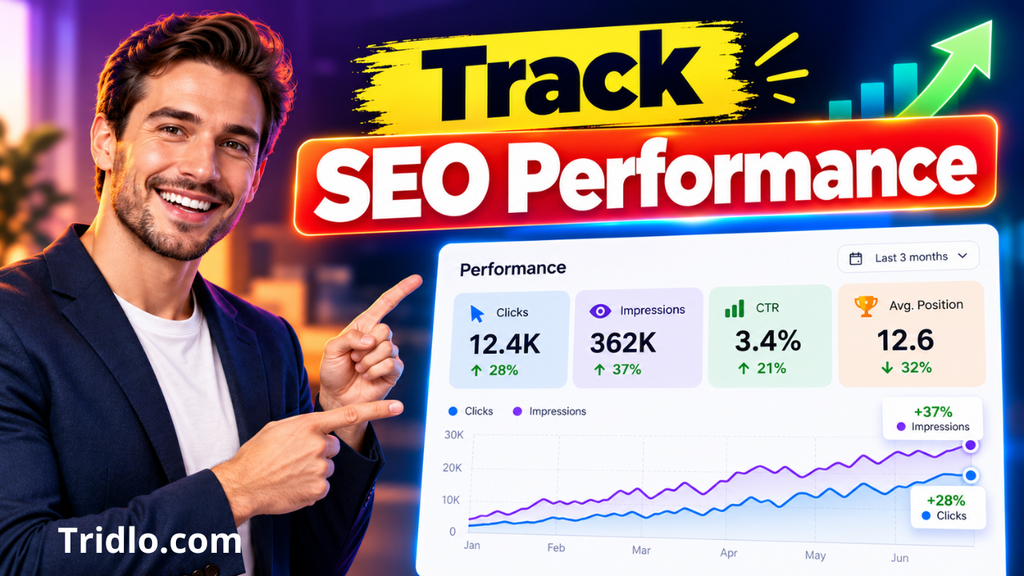
In the Performance report, examine:
Impressions: How often your pages were shown in eligible Google Search results.
Clicks: How many times users clicked through from those results.
Click-through rate: The percentage of impressions that resulted in clicks.
Average position: An aggregated measure of where your pages appeared for the selected searches and reporting dimensions.
Average position should not be interpreted as one fixed ranking. It can change depending on the queries, countries, devices, and dates included in the report.
Filter the data by page and query to understand what is happening.
For example, a page may be visible for a relevant keyword while receiving relatively few clicks.
That could justify reviewing its title, search snippet, audience fit, and the other results appearing for the same query.
However, a low click-through rate is not always evidence of a poor title. Search features and the nature of the query may also influence user behavior.
Diagnose the problem before making changes
| What you observe | What to investigate |
|---|---|
| An important page is not indexed | Indexing directives, accessibility, canonicalization, and content quality |
| The page is indexed but has very few impressions | Search demand, keyword relevance, and page usefulness |
| Impressions are increasing but clicks remain limited | Query intent, title clarity, and search results layout |
| A page attracts irrelevant visitors | Whether its content matches its target audience |
| Traffic drops across many pages | Technical changes, seasonality, reporting differences, and search changes |
| Several pages compete for similar searches | Overlapping content and whether consolidation would help |
Investigate before deleting, redirecting, or rewriting pages.
For a more detailed discussion of ranking improvements, see how to bring your website to the top of Google.
Measure meaningful business outcomes
Search traffic matters, but it is not the only useful measure.
If you operate an online store, look at purchases and qualified product visits.
For a service business, examine inquiries and relevant leads.
For an educational website, consider whether visitors discover additional resources and complete the actions your content is designed to support.
A page that attracts a modest but highly relevant audience may be more valuable to your business than one that receives substantial traffic without meaningful engagement.
10. Create a Practical 30-Day SEO Action Plan
You cannot guarantee a ranking increase in thirty days, but you can establish a useful foundation and identify what needs attention.
Here is a suggested first-month workflow.
Week 1: Audit your website
Connect Google Search Console, inspect your important pages, and review indexing issues.
Check your XML sitemap and identify technical problems affecting accessibility.
Choose a manageable group of valuable pages rather than attempting to optimize your entire website simultaneously.
Week 2: Research keywords and improve existing pages
Study the searches that are relevant to your audience.
Review the search results for your target queries.
Improve unclear titles, incomplete explanations, and poorly organized headings.
Pay particular attention to pages that already have some relevant visibility.
Week 3: Strengthen content and navigation
Create or substantially improve content that answers a useful question.
Add relevant internal links.
Ensure that important pages are accessible through your navigation and work comfortably on mobile devices.
Review image sizes, page performance, and distracting interface elements.
Week 4: Review performance and plan the next improvements
Examine Search Console reports for indexing changes and early performance signals.
Record the work completed and compare meaningful metrics over time.
Decide which pages need further improvement, which topics deserve new content, and which technical issues remain unresolved.
A month is enough to complete valuable foundational work. It is not necessarily enough for Google to fully process every improvement or for competitive keywords to show meaningful ranking changes.
Common Mistakes That Prevent Websites From Performing Well on Google
Several recurring mistakes can undermine otherwise useful SEO work.
Targeting keywords without considering intent
A high-volume keyword may be attractive, but it will not necessarily bring the visitors your website needs.
Choose topics that connect naturally to your audience, products, services, or expertise.
Publishing multiple pages with nearly identical content
Creating numerous articles that answer the same question with minimal differences can dilute the usefulness of your site.
When appropriate, consolidate overlapping material into a stronger resource.
Maintain separate pages when they genuinely address different needs.
Repeating keywords excessively
Adding the same phrase to every heading, image description, and paragraph does not make a page more helpful.
Use natural language and cover the subject thoroughly.
Ignoring indexing problems
Improving a page’s wording will not resolve every technical accessibility issue.
Verify that Google can reach and understand your important content.
Focusing only on the homepage
Many searches are better served by specific articles, service pages, or product pages.
Optimize the pages that most directly answer those searches.
Expecting instant results
Some changes may be reflected quickly, while others take considerably longer.
Google recommends allowing time to evaluate the effects of SEO changes.
Avoid making constant alterations based on a few days of fluctuating rankings.
Trusting guaranteed ranking promises
No legitimate SEO process can promise permanent first-place placement for every keyword.
Search results are influenced by many factors, including the query itself and changes in competing content.
Choose measurable improvements over unrealistic guarantees.
Frequently Asked Questions
How can I get my website to the top of Google for free?
You can begin with free resources such as Google Search Console, Google’s SEO documentation, and Google Trends.
Improve indexing, publish useful content, optimize important pages, and develop relevant internal links.
You do not have to buy advertising to become eligible for organic search results, although creating and maintaining a website may involve other expenses.
How long does it take for a website to rank on Google?
There is no universal timeline.
Google states that some changes can be reflected within hours, while others may take several months.
The amount of time required depends on factors such as indexing, existing visibility, competition, and the nature of your improvements.
Why is my website not showing up in Google Search?
Possible causes include indexing restrictions, technical accessibility problems, newly published content, canonicalization decisions, or content that Google has not selected for indexing.
Inspect the affected URL in Search Console before assuming the problem is related to keywords.
Can a new website rank on the first page of Google?
Yes, a new website can appear on the first page for relevant searches, but there is no guarantee.
Its opportunities depend on the query, the usefulness of its pages, competing results, and other factors considered by Google.
Focusing on specific audience needs may provide a more practical starting point than competing immediately for very broad searches.
Does Google Ads help my website rank higher organically?
No. Paying for advertisements does not directly improve a website’s organic ranking.
Ads and organic search are separate systems. Advertising may generate visits, but purchasing an ad placement does not buy an organic ranking position.
How many keywords should I use on one page?
There is no required number.
Choose a clear primary topic and use relevant terminology naturally.
A page can address several related search queries without repeating the same phrase excessively.
Prioritize the information readers need over keyword density targets.
Do backlinks still matter for Google rankings?
Links remain relevant to Google’s search systems, but their context and quality matter.
Relevant editorial references can support discovery and credibility. Manipulative link schemes can create risks.
Build resources that others have a genuine reason to recommend.
What should I do if my website is indexed but does not rank well?
Start by reviewing the queries and pages in Search Console.
Compare your content with the apparent intent behind those searches. Check whether the page offers substantial value, whether technical problems interfere with access, and whether its internal links are useful.
Improve the most meaningful weaknesses, then evaluate the results over a reasonable period.
Final Thoughts: Build Search Visibility That Lasts
Learning how to get your website at top of google search begins with understanding that rankings are an outcome, not a setting you can simply switch on.
Start by making your important pages accessible to Google. Research what your audience needs, answer those questions thoroughly, and ensure that visitors can navigate your website without unnecessary difficulty.
Use Search Console to identify actual problems instead of guessing.
Then keep improving the pages that matter most to your readers and your business.
Your next step: Choose one valuable page on your website today. Check its indexing status, compare it with the search intent of its target keyword, and make one meaningful improvement. Use the results to guide your next decision.


